 We’re live on Product Hunt today

Move from Another Cloud
Moving from Google Drive, without the guesswork.
Roomtide copies a folder from Google Drive for desktop into your drive, checks every copy against its original, and checks again once it’s uploaded. Nothing in Google Drive is changed or removed.
A Mac with Apple silicon and macOS 26 or later. From $3.99 a month.
Three steps, checked twice.
No exporting, no zip files, no guessing whether everything made it.
Choose a Google Drive folder
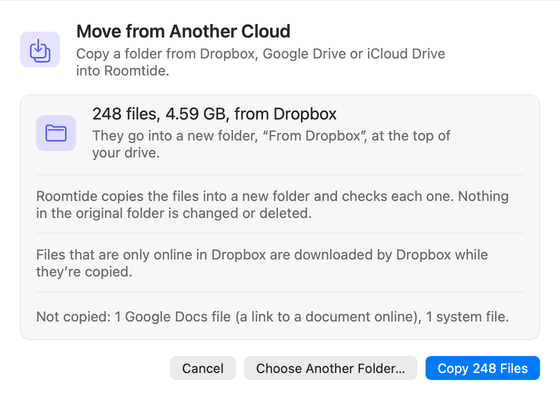
In Roomtide, choose File › Move from Another Cloud… and pick a folder in Google Drive. Before anything is copied, Roomtide shows how many files there are, how much space they need and the new folder they’ll go into, “From Google Drive”.
Copy, and check every copy
Roomtide copies the files into that new folder and compares each copy with its original. A file that changes while it’s copied is copied again.
Upload, and check again
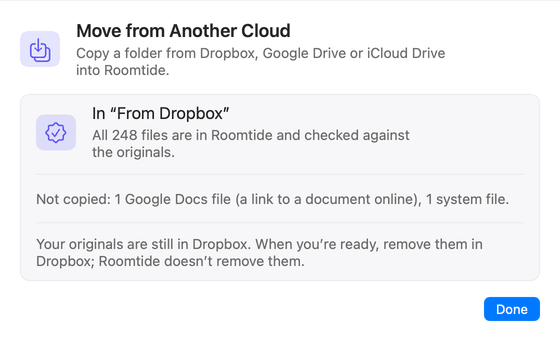
Each file is uploaded, encrypted on your Mac first, and checked once more against the original. The report says when every file is in Roomtide and checked.

Your originals stay put.
Roomtide copies; it never moves. Nothing in your Google Drive folder is changed or deleted, so if you change your mind, everything is still there. The report ends with Show Originals in Finder, and you decide when, or whether, to clear out Google Drive.
What Roomtide leaves out
- Google Docs, Sheets and Slides files: on your Mac they are links to documents online, not the documents themselves
- Links and aliases
- System files
Everything left out is counted in the review before you start and again in the report, so nothing goes missing quietly.
Good to know about Google Drive folders
Roomtide works with the Google Drive folder that Google Drive for desktop puts in Finder. Choose a folder there, and the copies go into a new folder called “From Google Drive”.
Google Docs, Sheets and Slides files are different from ordinary files. On your Mac they are small links that open the document online, so copying them would bring over a link, not your writing. Roomtide leaves them out and counts them in the review and the report. To bring those documents along, download them from Google as Word, Excel, PDF or other files first, into the folder you are about to copy.
If Google Drive keeps files online only, Google Drive downloads them to this Mac as Roomtide reads them, and Roomtide says so before it starts. Afterwards your files live in Finder like the rest of your drive; files on demand in Finder explains how cloud-only files save space, and the security page lists what is encrypted.
More: Move from Another Cloud, step by step · Roomtide and Google Drive compared · Move from Dropbox · Move from iCloud Drive
Does Roomtide delete anything in Google Drive?
No. Roomtide only reads the folder you choose. It never changes, moves or removes anything there, and the report ends by telling you your originals are still in Google Drive. When you’re ready, you remove them in Google Drive yourself.
How do I move my files from Google Drive?
Install Roomtide and sign in, then choose File › Move from Another Cloud… and pick a folder in your Google Drive folder in Finder. Roomtide copies it into “From Google Drive”, checks each copy against its original, and checks again after upload.
Why weren’t my Google Docs copied?
On a Mac, a Google Docs, Sheets or Slides file is a link to a document online, not the document itself. Download those documents from Google in a format such as .docx, .xlsx or PDF, then copy that folder.
How much free space do I need?
The copy goes onto this Mac first, so this Mac needs room for the whole folder plus 2 GB, and your Roomtide plan needs room for it too. Roomtide checks both before it starts. Once every file is uploaded and checked, Remove Downloads in Settings › Storage can give that space on this Mac back.
Can I quit while it works?
Keep Roomtide open while it copies. Once the copy is done you can quit: the files keep uploading, and the check and the report come back when you open Roomtide again.
Is Roomtide a way to keep a second copy of my Google Drive files?
Roomtide keeps one copy of your files in your cloud drive. It is not a backup. Keep a separate backup, for example with Time Machine.
Room for everything you bring.
Pick the plan that fits your Google Drive folder. Every plan has every feature.
250 GB, billed yearly
Launch price$3.33per month
2 months free
Billed $39.90 yearly instead of $47.88 for 12 monthly payments
≈ $0.013 per GB a month
Launch price, locked in for as long as you stay subscribed. New subscribers pay $59.90 a year later.
For a working set of documents, photos and a few projects.
Most popular
1 TB, billed yearly
Launch price$10.00per month
2 months free
Billed $119.90 yearly instead of $143.88 for 12 monthly payments
≈ $0.010 per GB a month
Launch price, locked in for as long as you stay subscribed. New subscribers pay $149.90 a year later.
For video and photo libraries and finished client work.
2 TB, billed yearly
Launch price$20.00per month
2 months free
Billed $239.90 yearly instead of $287.88 for 12 monthly payments
≈ $0.010 per GB a month
Launch price, locked in for as long as you stay subscribed. New subscribers pay $299.90 a year later.
For large photo libraries and years of finished projects.
5 TB, billed yearly
Launch price$50.00per month
2 months free
Billed $599.90 yearly instead of $719.88 for 12 monthly payments
≈ $0.010 per GB a month
Launch price, locked in for as long as you stay subscribed. New subscribers pay $699.90 a year later.
For raw footage, big sample libraries and long-kept client work.
250 GB, billed monthly
Launch price$3.99per month
≈ $0.016 per GB a month
Launch price, locked in for as long as you stay subscribed. New subscribers pay $5.99 a month later.
For a working set of documents, photos and a few projects.
Most popular
1 TB, billed monthly
Launch price$11.99per month
≈ $0.012 per GB a month
Launch price, locked in for as long as you stay subscribed. New subscribers pay $14.99 a month later.
For video and photo libraries and finished client work.
2 TB, billed monthly
Launch price$23.99per month
≈ $0.012 per GB a month
Launch price, locked in for as long as you stay subscribed. New subscribers pay $29.99 a month later.
For large photo libraries and years of finished projects.
5 TB, billed monthly
Launch price$59.99per month
≈ $0.012 per GB a month
Launch price, locked in for as long as you stay subscribed. New subscribers pay $69.99 a month later.
For raw footage, big sample libraries and long-kept client work.
Every plan includes
- Encrypted on your MacContents, names and keys, before upload.
- Free Up SpaceReview, verification and a 24‑hour hold.
- Recently Deleted30 days to put things back.
- Version history30 days, up to 10 versions per file.
- Up to 5 MacsAdd a Mac by approving it from one you already use.
- Cancel anytimeYour plan runs to the end of the month or year you paid for.
- 3‑day refund on your first paymentMonthly or yearly: ask within 3 days and we refund it in full.
- No ads, no cross-site trackingNo ads in the app. No ad pixels or third-party scripts on this site.
Prices in USD; Polar shows the final price, including any tax, at checkout. Yearly plans are paid once a year and renew every year. Storage counts your current files plus old versions and Recently Deleted items.
Bring your files home to Finder.
A Mac with Apple silicon and macOS 26 or later. Download Roomtide, sign in with your email, then choose File › Move from Another Cloud….